Features
Main features:
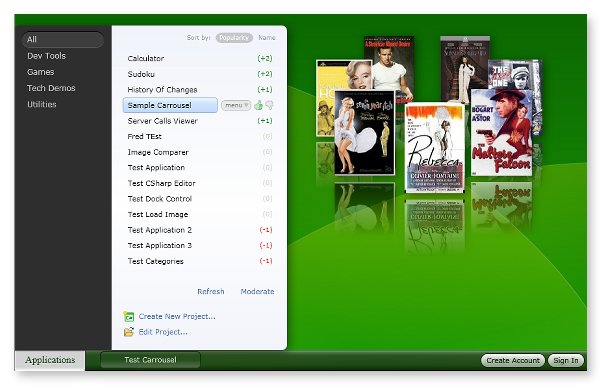
- A start menu lets you launch applications without
installation
- See how applications work by clicking their Edit
Source button
- Develop new applications right away from the browser
- Mac OS users can write C# / .NET / Silverlight
applications without a PC
- Start developing an application and then let the
community finish it
- Copy/paste source code from other apps or quickly
reuse components
- Share applications by embedding them into web pages
Overview:
Access your applications and data from any computer
Wiki-OS simulates an operating system inside your web
browser. It lets you to launch rich-client applications
without installation and access your data from any computer
connected to the Internet. Applications are executed in a
sandbox that securely isolates them from the rest, so that
your computer is always protected.
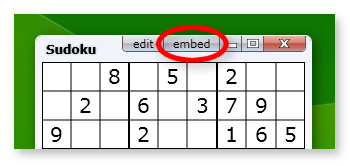
Embed applications on your website or blog.
Similarly to how you can put a YouTube video on a website
or blog, you can put a Wiki-OS application inside any web
page. Just click the "embed" button at the top-right corner
of any application and copy/paste the code snippet.
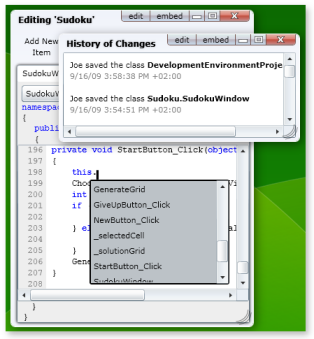
Collaboratively develop applications using the online
development environment
Wiki-OS includes all the tools to get started writing
Silverlight and .NET applications in seconds. It provides a
built-in source control to work collaboratively. The code
editor supports C# 4.0 and provides syntax highlighting,
auto-completion, and an easy-to-use User Interface designer.
Deploying an application is as simple as sharing
a URL
Just append the name of a project and a class to the
Wiki-OS.org address and you have a direct link (e.g.
www.wiki-os.org/CalculatorProject/Calculator to launch
the calculator).
Contribute to applications as easily as a wiki
Wiki-OS includes patent-pending technologies by
Userware to make contributing to an application as easy
as modifying an article of a wiki.
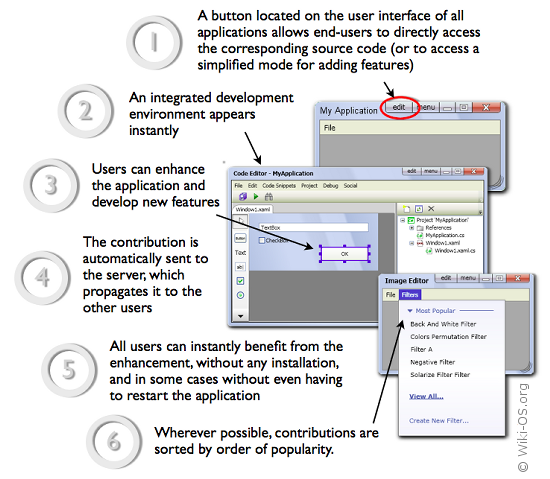
(the screenshots in the diagram above are taken from the
WPF-based version of Wiki-OS.org)
Wiki-OS is currently available in two versions:
- Silverlight-based version (enter):
this is the recommended version of Wiki-OS. It is
cross-platform PC and Mac (Linux soon). It provides
unique features such as the ability to embed
applications into web pages.
- WPF-based version (enter):
this version allows launching and developing
full-featured rich-client applications that leverage the
power of the .NET Framework 3.0+, including
hardware-accelerated 3D graphics. No installation is
required on IE under Vista and Win 7.